Which calorie app should you actually use?
A fair 2026 comparison of the big calorie apps, what they quietly charge for, and where Ampsu comes out ahead.
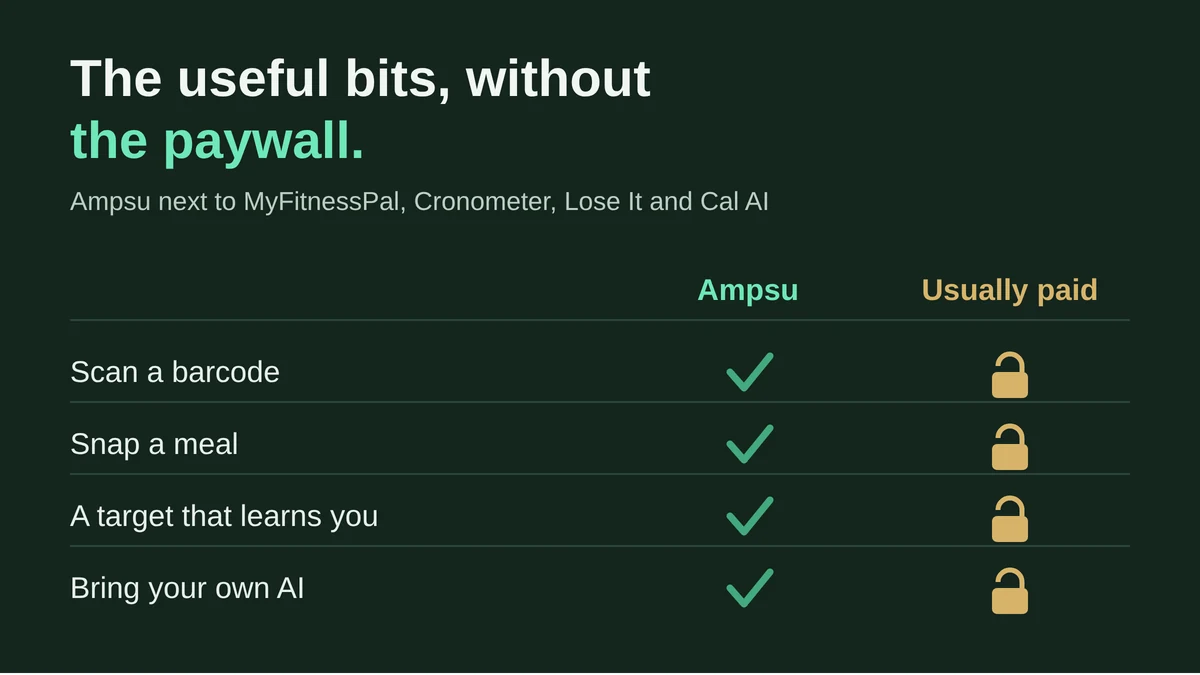
Open the app store, search "calorie counter", and you get a few hundred results that all look the same. Green rings, a barcode button, a camera button, a cheerful little streak. Then you pick one and start logging, and the barcode button wants a subscription. So does the photo. So does the feature that was meant to work your calories out for you.
Here's the short version. If you're in Europe and you want to scan, snap and log without hitting a paywall every other tap, that's the case for Ampsu. Today the basics are all there. The longer version, with the other apps laid out fairly, is below. I built one of these, so take the enthusiasm with a pinch of salt, but the prices and the paywalls are easy enough to check yourself.
| App | Cost to use | Barcode scan | Photo / AI logging | Learns your burn | Your own AI | Based in |
|---|---|---|---|---|---|---|
| Ampsu | Free right now | ✓ Yes | ✓ Yes | ✓ Yes | ✓ Yes | Estonia (EU) |
| MyFitnessPal | Free with ads, or ~$80/yr | ✗ Premium | ✗ Premium | ✗ No | ✗ No | US |
| Cronometer | Good free tier, or ~$55/yr | ✓ Free | ✗ Gold | ✗ No | ✗ No | Canada |
| Lose It! | Free tier, or ~$80/yr | ✗ Premium (new accounts) | ✗ Premium | ✗ No | ✗ No | US |
| MacroFactor | No free tier, ~$72/yr | ✓ Yes | ✓ Yes | ✓ Yes | ✗ No | US |
| Cal AI | Free app, photos paid (~$30-40/yr) | ✓ Yes | ✗ Paid | ✗ No | ✗ No | US |
| Yazio | Free tier, or ~€30/yr | ✗ PRO | ✗ PRO | ✗ No | ✗ No | Germany (EU) |
Rough 2026 figures. Prices change often and vary by region, so check each app's own page before you pay. A ✓ means the feature is there without a separate subscription tier, not just that it exists somewhere.
What do they actually cost?
The headline price is the easy part. What matters is which everyday features sit behind it.
- MyFitnessPal is free to log by hand, with ads. The barcode scanner has needed Premium since 2022, and Premium runs around $80 a year. It added an AI coach in June, also Premium, in a handful of English-speaking countries.
- Lose It! is much the same story. A new account now needs Premium to use the barcode scanner, and the Snap It photo feature is paid too. About $80 a year.
- Cronometer has the kindest free tier here. You keep barcode scanning and the full nutrient breakdown for nothing. Photo and voice logging live in Gold, roughly $55 a year.
- MacroFactor has no free version at all. You get about a week to try it, then it's around $72 a year.
- Cal AI is free to download, but the photo scanning it's built around is a subscription, usually $30 to $40 a year.
- Yazio, from Germany, has a real free tier, but the barcode scanner and the photo logging are PRO, about €30 a year.
Ampsu doesn't play that game. The barcode scanner, the photo estimate, saved meals, the target that learns you, they're all in the app, not a row of upsells you pay off one at a time.
Will it find the food from my shop?
The giant databases quietly let Europe down here. Supermarket own-brands often carry a barcode from a range that retailers assign themselves, and those codes don't live in the big global databases. So you scan a supermarket own-label, a Carrefour or a REWE or a Morrisons, and a US-built app comes back blank.
Ampsu's database is built around European shelves, own-brands included, and if something's missing you can add it in a few taps and it's there for the next person. Loose food weighed at the counter is a trickier case, because the sticker has a different barcode every time. Save one and Ampsu remembers it for you. It's a hard advantage for a US-built app to match. Covering European products is slow, unglamorous work, and it's either there or it isn't when you're standing in the shop holding the packet.
The size race misses the point anyway. A database with tens of millions of entries sounds impressive until half of them are duplicates someone typed in wrong, and the one product in your hand still isn't there. What counts in the shop is whether the scan lands on the right packet first time. Ampsu pours its effort into exactly that on this side of the Atlantic: the regional brands, the supermarket own-labels, and the weighed sticker from the deli counter that no global database was ever going to carry.
How quick is logging, really?
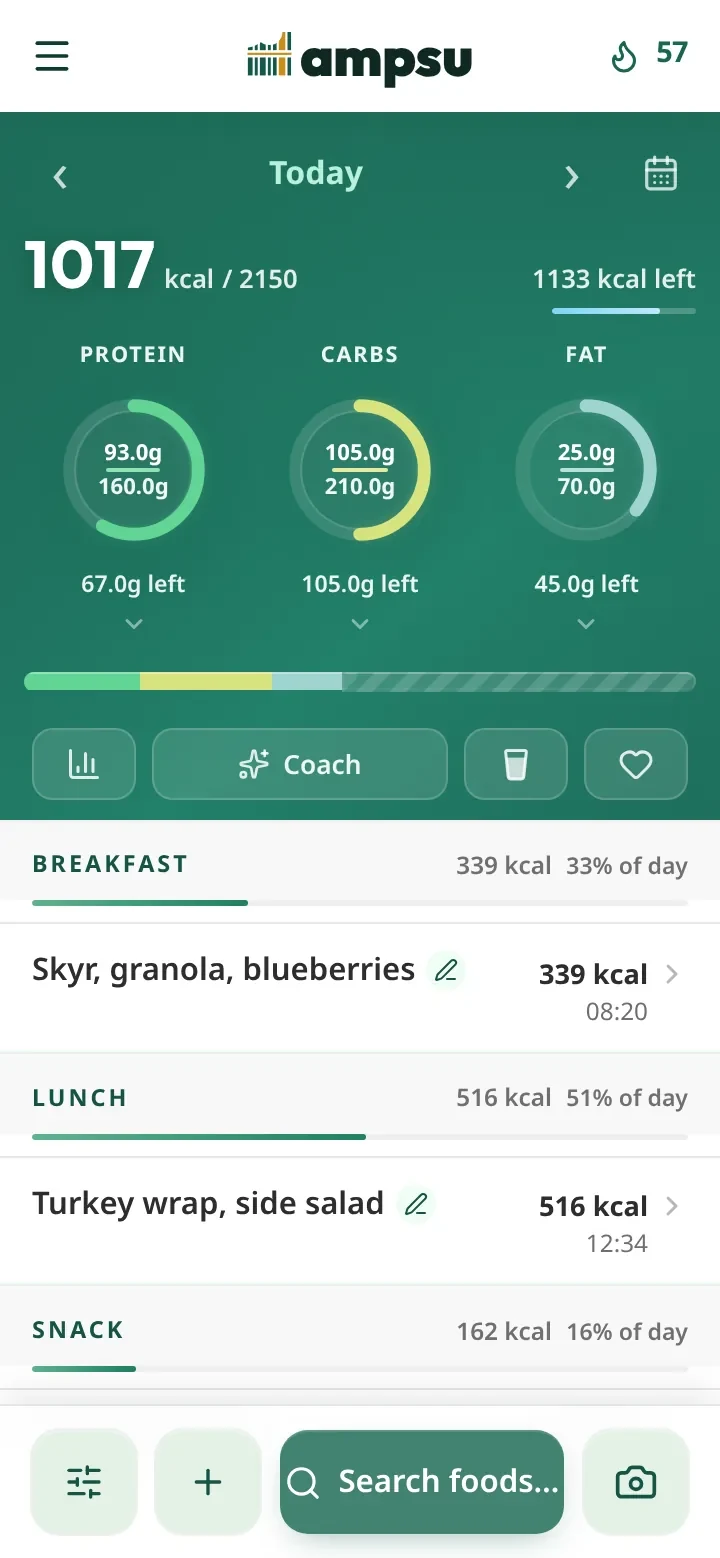
The first week decides whether you keep going, and that comes down to how fast a normal day goes in. Ampsu leans on the shortcuts: scan or search to find a food, save the meals you eat on repeat and log them with one tap, keep recipes with their cooked weight, or copy a day that looked like today and change what's different.
The friction hides in the small stuff, and weighing is where it bites. Say you're doing it properly with a kitchen scale. On MyFitnessPal most entries open on some serving like "1 cup" or "1 container", so to log what the scale says you change the unit to grams, clear the amount, then type the number, every single time. Ampsu leads with grams, and keeps servings for the foods that come in them. You read the figure off the scale, type it, and it's in, or pick the serving when that's what's in front of you. Either way you pick what matches instead of fighting the unit. It sounds like nothing until you've done that little dance six times before lunch.
"Quick to log" lives or dies on that. Cronometer's own reviewers bring up how slow its search feels, and MyFitnessPal buries the right result under near-duplicates and then charges you those extra taps on top. Fewer taps, every meal, every day, is most of the battle.
Does it learn what my body actually burns?
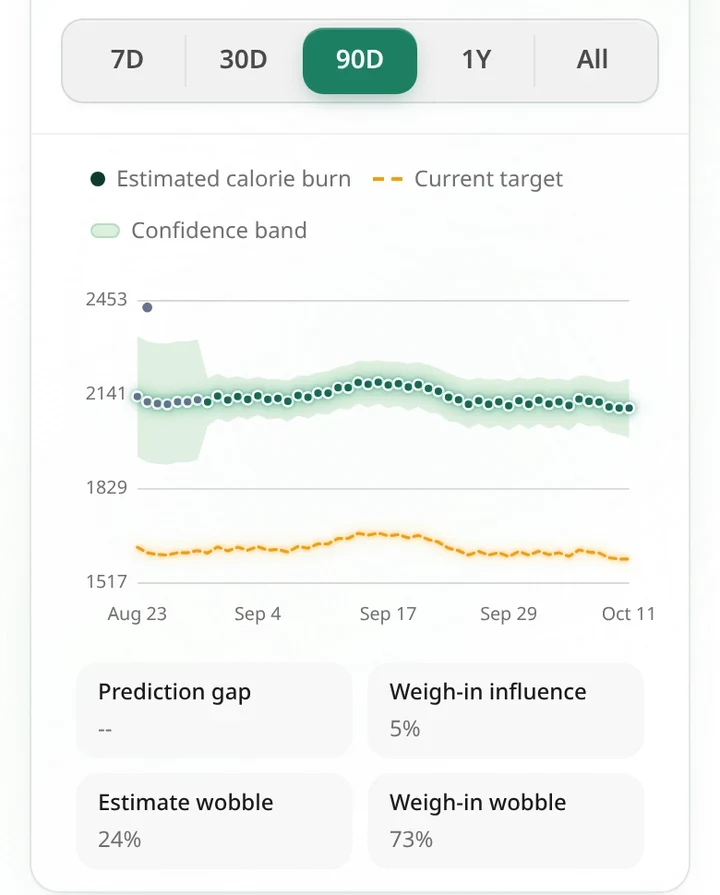
A calculator guesses your calorie needs from your height, weight, age and a dropdown asking how active you are. It's a fair starting point and Ampsu starts there too. Then it watches what your weight does against what you logged, and corrects the target to fit you instead of the formula. The longer you log, the more it's your number and not a guess, and it keeps adjusting as your body changes over a long diet.
The benefit shows up on a bad week. When the scale sticks, you usually can't tell whether your body has slowed down or you've been underlogging, so you poke at the target and hope. Ampsu separates the two for you: it reads the trend, moves the estimate, and shows you which one it thinks is going on. MacroFactor built its reputation on this kind of adjustment and does it very well. Ampsu does the same job and doesn't charge for it. You can read how the estimate works for the detail. MyFitnessPal, Lose It!, Cal AI and Yazio mostly hand you a fixed target and leave the adjusting to you.
Four ways to set the goal
Letting the app learn your burn is one mode of four, because what suits you in January might not suit you by June.
- Auto works a target out from your body metrics. A sensible default when you're starting out.
- Metabolism is the adaptive one above, learning your real needs from your log and your weight trend.
- Fixed is the exact number you set, for when you'd rather stay in control.
- Scheduled gives different days different targets, on the week or on a cycle of your own. Say you train every other day: set a higher target for training days and a leaner one for rest days, tell it to repeat every two days, and it carries the pattern forward on its own. A bigger weekend with leaner weekdays works the same way.
You switch between them whenever one stops fitting, which most apps don't let you do.
Does it just show me numbers?
Most trackers, once you've logged the day, hand you back a coloured ring. Green if you're under, red if you're over, and that's the end of it. Ampsu reads the day, and the weeks around it, and tells you the one thing worth knowing. Maybe the week is fine even though today ran over. Maybe your protein is short and there are no calories left to fix it. Open it at breakfast and it looks at the day ahead; open it after dinner and it looks back; on Sunday it recaps the week, your streak and your weight trend.
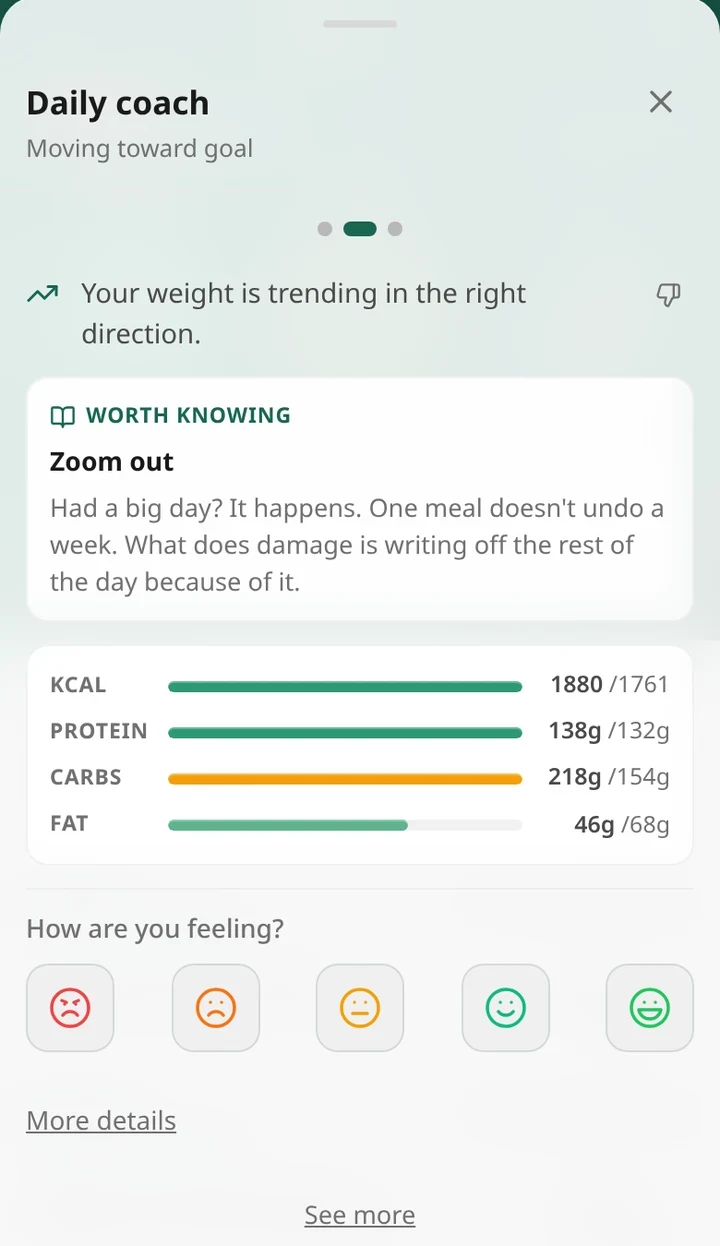
There's no chatbot inside it, on purpose. Every line is written in advance and filled in with your own numbers, so it can't invent a figure about your body the way a language model can, and the same day always gets the same read. Here's how the coach works if you want to look closer. It turns a pile of numbers into something you can act on.
What about the "just take a photo" apps?
A whole wave of apps now sell one promise: point your camera at dinner and never log by hand again. Cal AI is the best known of them. For a clean, recognisable plate it's a lovely demo. The catch is that a photo can only ever estimate the food, and these apps lean on it as the main way in. When the guess is off, and it often is, there's not much solid holding the number up.
And it is wrong. This year a group of US researchers weighed more than a hundred real meals to a tenth of a gram and ran four popular apps against them. All four came in about a third low, and the photo-first one came in lowest of the lot. Fat is what they miss most, so the more oil and cheese on the plate, the further out the number.
Ampsu has photo logging too. The difference is where it sits: on top of a real European database, barcodes and a scale, so the camera is one shortcut among accurate options rather than the whole app. It shows you the numbers to adjust before you save, because a guess you can correct beats a guess dressed up as a fact. For a restaurant plate or someone's home cooking, it's handy. Just be wary of an app whose only trick is the one researchers caught missing a third of the meal.
Can I bring my own AI?
This is the one none of the others do. Ampsu runs an MCP server, the open standard AI assistants use to plug into other tools, so in Settings you can connect it to Claude, ChatGPT or anything else that supports MCP, then ask about your own numbers. How's my protein been this week. What can I have for dinner with 600 kcal left. Tell it what you ate and it logs it for you. It only ever sees your account, and nothing connects until you create the token yourself.
Who's reading my food diary?
A food diary says more about you than it looks. When you eat and how much, the drinking, the weekends, whether you're dieting, sometimes a pregnancy or a health scare showing up in the numbers before you've told anyone. That's exactly the sort of data the ad industry pays for, and it's a big part of why so many health apps are free.
Ampsu isn't built that way, and of everything here it's what I care about most. It doesn't sell your data, it doesn't build an advertising profile out of you, and there are no third-party trackers sitting in the corner taking notes. It runs on EU servers under European privacy law, so the rights over your data are real: export the lot, or delete your account for good and watch it go, whenever you want. Sharing is off until you turn it on. You only show progress inside a group you've chosen to join, and you decide what's visible. Your meal photos stay on your phone unless you scan one yourself, and they're never used to train anyone's AI.
Look at who pays. The free tiers of MyFitnessPal and Lose It! are paid for with ads, which is its own answer to who the real customer is, and MyFitnessPal has a 150-million-account breach in its history. Cronometer and MacroFactor take the better road and charge money instead of mining your data. Ampsu won't touch your data either, because it's made by a small independent team in Estonia that would rather build the thing than sell the people using it.
Is there a reason to pick one of the others?
For most people in Europe or the UK, not much of one. The features the big apps charge extra for, the scanning, the photos, a target that adapts to you, are already in Ampsu, with the European coverage better on top. There are a couple of narrow cases where another app has a real edge, and it's only fair to name them.
- If you want to track micronutrients to the last decimal, every obscure one, Cronometer goes deeper. Ampsu counts the 18 vitamins and minerals that matter for most people. Past that is a niche, and you'll know if you're in it.
- If you're already years into MyFitnessPal with a long friends list and every gadget wired up, the pull to stay is real, though your history can come with you.
The one honest gap on Ampsu's side is the iPhone. The Android app and the web app are ready today, and the iPhone app is still on the way. Until then, the web app adds to your home screen and opens full-screen like any other.
Already logging somewhere else?
If you've got months of history in MyFitnessPal or Cronometer, you don't have to throw it away to switch. Export your data as a CSV and import it into Ampsu, and your past days come with you.
Start here: pick one, log a normal day, and see how it feels in your hand. If you want the quick version, install Ampsu, scan something off the shelf, and open the coach tonight. Worst case, it costs you a day to find out.