Metabolism mode: how Ampsu learns what you actually burn
What metabolism mode does with your food log and weigh-ins, why it beats a calculator after a few weeks, and how to get a number you can trust out of it.
Three weeks in, you've hit your 1,800 kcal target nearly every day. The calculator promised about half a kilo a week. The scale has barely moved. So either your logging is off, or the calculator is wrong about you, and annoyingly it's usually a bit of both.
Metabolism mode is my attempt at sorting out which. It compares what you logged with what your weight actually did, works backwards to what you must have burned, and sets your target from that. Give it about two weeks of logging and a few weigh-ins a week, and your target gets built from your own numbers instead of a formula's guess about someone your size.
It's also the part of Ampsu I've spent the most time on, and the part I've broken and fixed the most times. So this is how it works, what it's good for, and where it still falls short.
Why can't a calculator work this out?
A calorie calculator takes your height, weight, age and sex, estimates what your body burns at rest, then multiplies that by an activity level you pick from a dropdown. Ampsu's Auto mode does the same, with the Mifflin-St Jeor formula. It's a sensible place to start.
The catch is that it's an average of other people. Even the best of these formulas is only aiming to land within 10% of what a lab would measure. On a 2,000 kcal day that's 200 kcal either way, and the activity guess hasn't even had its turn yet. Two people with the same height, weight and age can burn different amounts, too. In one study, about a quarter of the difference in resting burn couldn't be pinned on anything they measured.
Then there's the dropdown. I went through a lot of calorie apps before building this one, and that dropdown was always the number I trusted least. "Lightly active" and "moderately active" are a few words apart and several hundred calories apart, your honest answer changes from week to week, and I was never going to keep updating a setting to match. The formula can't know which week you're having, but your scale has a pretty good idea.
For a while I did let your onboarding answer act as a cap on the learned estimate, as a sort of safety net. Then I tested how long a wrong answer actually matters: two to four weeks, after which the real data has washed it out completely. So the cap was only ever overruling better evidence with a guess, and I took it back out.
How does it work?
The core of it is arithmetic you could do on paper. Say that over three weeks:
- you logged an average of 2,100 kcal a day,
- and your weight trend went down by 0.9 kg.
A kilo of body weight holds roughly 7,000 kcal of stored energy for a typical person (I'll come back to that number, because it caused me some grief). So 0.9 kg is about 6,300 kcal that came out of storage, or 300 kcal a day over 21 days. You ate 2,100 and drew 300 from your reserves, so you burned about 2,400 kcal a day. That's your maintenance, measured. If your goal is to lose 0.5 kg a week, the target goes about 500 kcal below it.
Seeing MacroFactor do this was one of the things that convinced me Ampsu was worth building in the first place. Metabolism mode redoes that sum every day over roughly the last three weeks, so the estimate keeps up with you. Everything else in the engine is there to stop that simple sum from being fooled.
Won't one heavy morning throw it off?
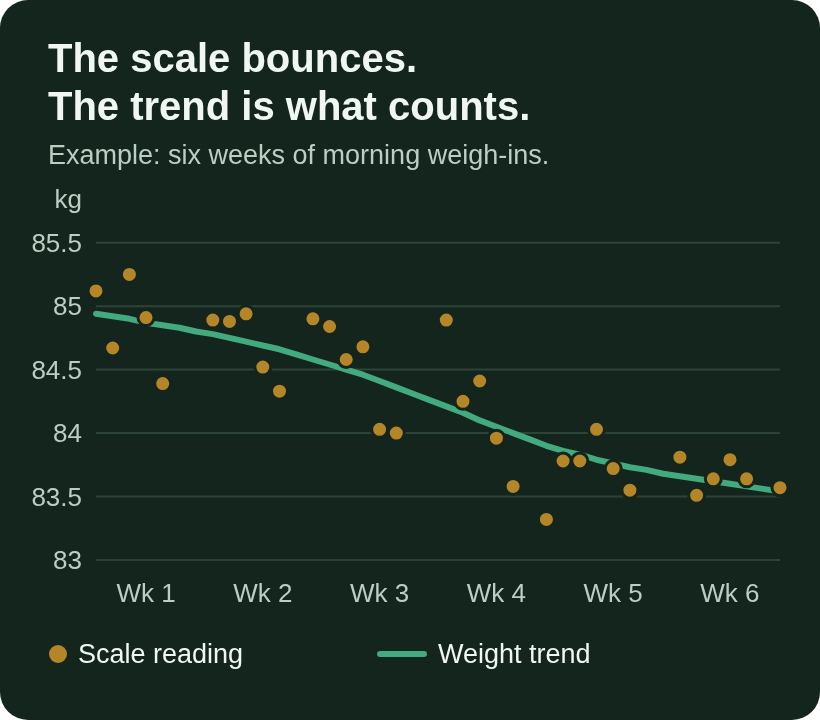
Body weight moves around a lot for reasons that have nothing to do with fat. Every gram of stored carbohydrate (glycogen) is kept with about three grams of water, which is why the morning after pizza is never a fun weigh-in. Salt, a late dinner and a hard workout all move the number too, and weight tends to peak after the weekend and drift down by Friday.
So Ampsu smooths your weigh-ins into a trend first and does its maths on that. One heavy morning nudges the trend a little; a week of heavier mornings moves it properly.
A kilo lost isn't always the same kilo
You've probably heard that a kilo of fat is 7,700 kcal. Fine, except nobody loses pure fat. Some of what goes is lean tissue, which holds far less energy, and the leaner you are, the bigger that share. So unless you're carrying quite a lot of fat, a lost kilo is worth less than 7,700, sometimes a fair bit less.
This is the one that bit me. An earlier version of the engine priced lost weight like early-diet water weight, at a low figure, however long you'd been dieting. It took me until this September to build a proper test for it: a simulated body that eats whatever target the engine hands it. The person it hurt most turned out to be the one doing everything right. Someone eating exactly to target and logging honestly watched their target slide down to the 1,200 kcal floor, and lost about 40% faster than the pace they'd picked. Not great for a feature whose whole point is being on your side.
Now each kilo is priced for your body, using an estimate of your body composition. If you add a body-fat reading to a weigh-in, it uses that and gets sharper.
Your resting burn comes from your lean mass
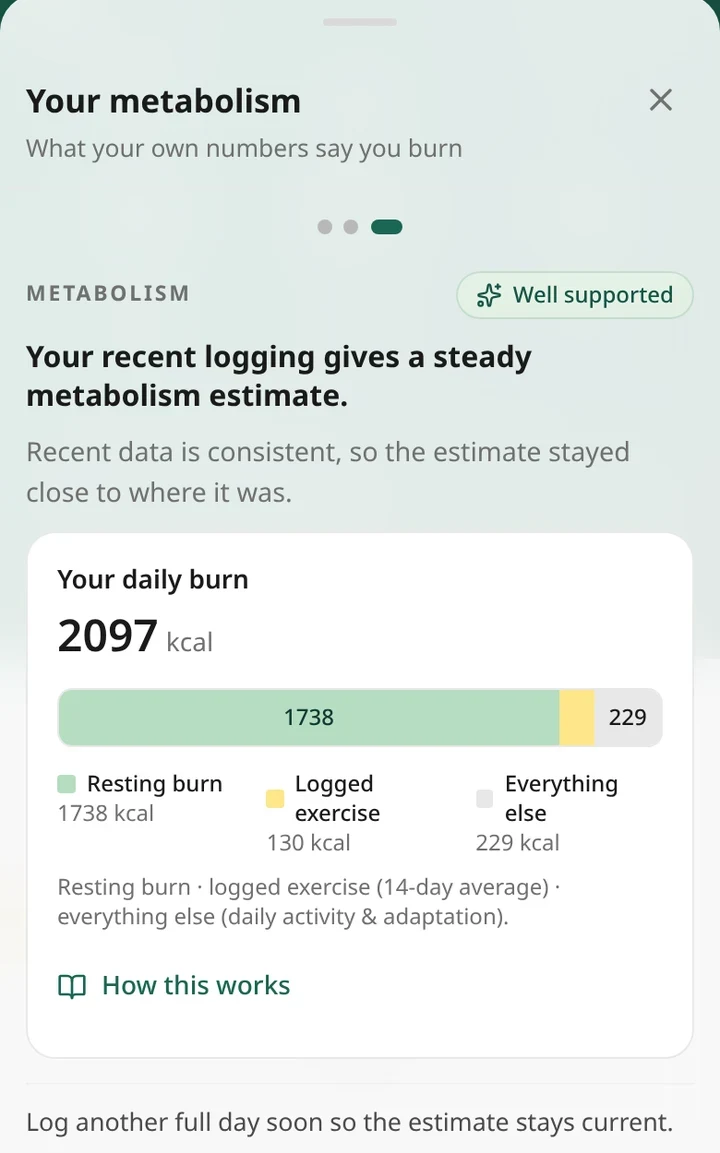
The same estimate gives your resting burn, worked out from your lean mass rather than your total weight (Cunningham's equation, if you're curious). That's what lets the app split your daily burn into three parts: resting burn, the exercise you logged, and everything else, like walking to the shop or fidgeting in meetings.
Your body adjusts while you diet
As you lose weight you burn less. Some of that is because there's less of you, and some is your body pulling back a little on top (adaptive thermogenesis, if you want the term). That second bit is real, but smaller than the internet makes it sound. The scary numbers mostly come from Biggest Loser contestants, which is not most people's diet. The bigger effect is the boring one: your burn shrinks along with you, which is why the old rule of thumb promises roughly double the weight loss people actually get.
Metabolism mode follows that drop automatically, because it's measuring your burn and the drop shows up in the measurement. It also carries a small, capped allowance for adaptation, so it's ready for the slowdown instead of only discovering it weeks later.
It has guardrails
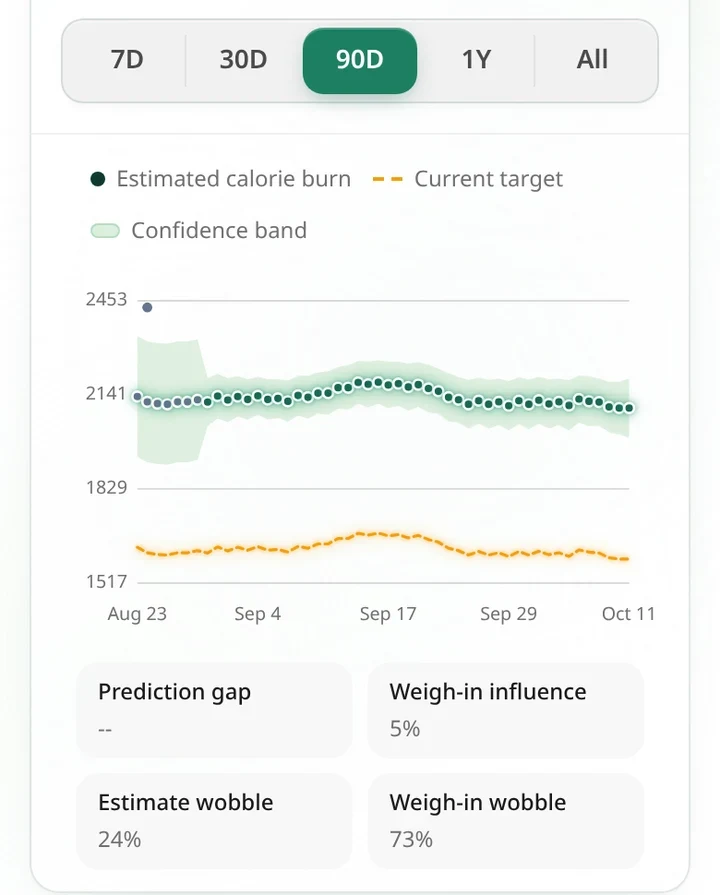
The estimate is never allowed below 1.2 times your resting burn, or above 2.4 times. The ceiling sits a touch under what endurance research suggests is about the most a human can keep up for weeks, measured on people running six marathons a week across the United States. If your log and your scale ever seem to say you burn more than that, something in the data is off, so the estimate stops at the limit instead of following it. At the bottom end it does something more useful: it assumes some food is missing from the log, and once that gap gets big, the Stats page tells you roughly how much.
The floor earned its keep during testing, too. One early draft of my test setup managed to invent a person who burned 1,500 kcal a day at 86 kg, which is less than it takes to stay alive. The engine flatly refused to believe them and sat on its floor. Fair enough.
How long before I can use it?
It needs data before it has anything to say. You can switch it on after about a week, once it has at least five logged days and two weigh-ins, and it'll call itself Still learning. Once it has two weeks of mostly complete logging, three or more weigh-ins and no stretch longer than a week without one, it stops treating itself as provisional, and the label climbs to Settling in and then Well supported as the data builds up. Until then, use Auto mode, which gives you a target from day one.
On days you log, try to get at least 600 kcal in. That's how the app tells a genuinely light day apart from a day you forgot about, and a forgotten day that looks like a fast would make your burn look lower than it is.
What do I get out of it?
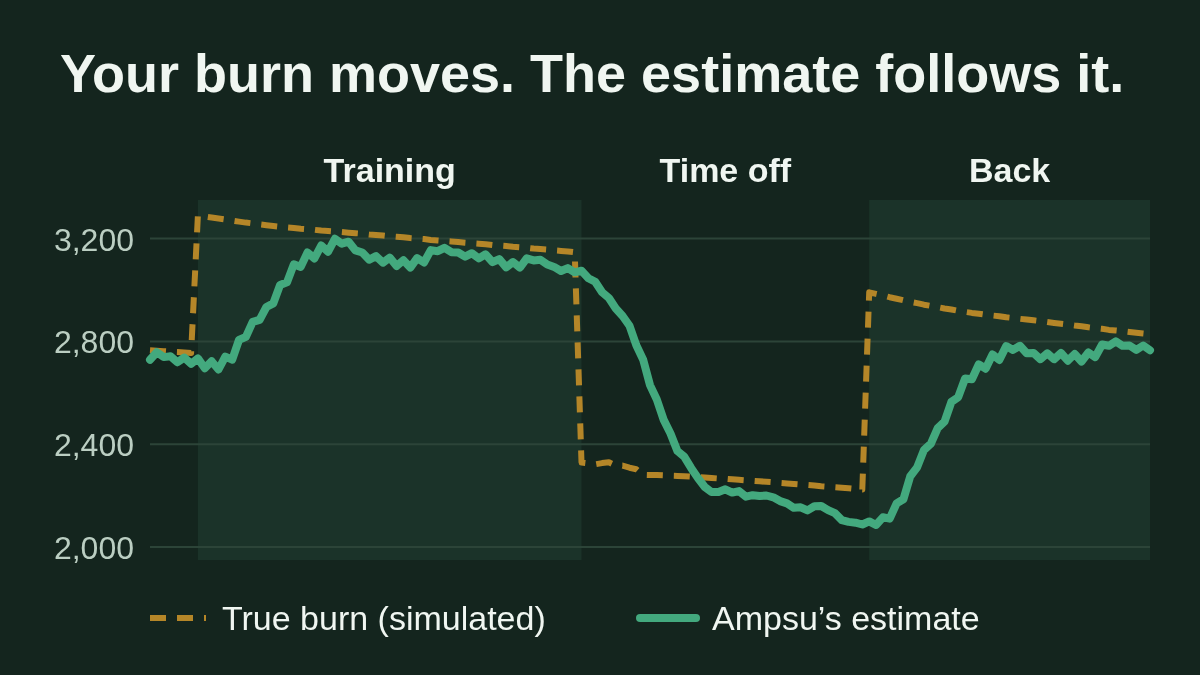
A target that keeps up with your life. Start a training block and your burn goes up. Get injured, or let December happen, and it comes down. In Auto mode your target only moves when your weight or your activity setting changes, and most people never touch the activity setting again (guilty). Metabolism mode notices on its own, because your weight trend gives it away.
No exercise maths. This is the bit I like most. You don't need to log workouts or "eat back" the calories a watch says you burned. That's good, because a Stanford test of seven wrist trackers found none of them estimated calories burned to within 20%. Your training shows up in your weight trend whether you log it or not. Log workouts if you like seeing them; the estimate doesn't depend on it. One less thing to think about.
Straight answers when things don't add up. If your weight is moving less than your logged deficit predicts, the coach says so. It doesn't decide you're doing something wrong. Illness, stress and a new scale can all do it. But a few weeks of that is useful to know.
What if my logging isn't perfect?
Nobody's is. In one classic study, a small group of people who couldn't lose weight on a reported 1,200 kcal a day turned out to be eating about twice what they wrote down. Their metabolisms were normal. Food is hard to count, and that's before the oil in the pan.
Forgetting the same things every day mostly comes out in the wash. If the cooking oil and the milk in your coffee never make it into the log, your logged intake runs low, so the estimated burn runs low too, and your target drops with it. The same things are missing from the diary you compare against that target, so you still end up roughly where you meant to be.
What actually trips it up is an inconsistent log: a full week, then a weekend of nothing, then a day with only lunch. So when a day goes sideways, tell it. Open the coach and swipe right to Anything throw today off?
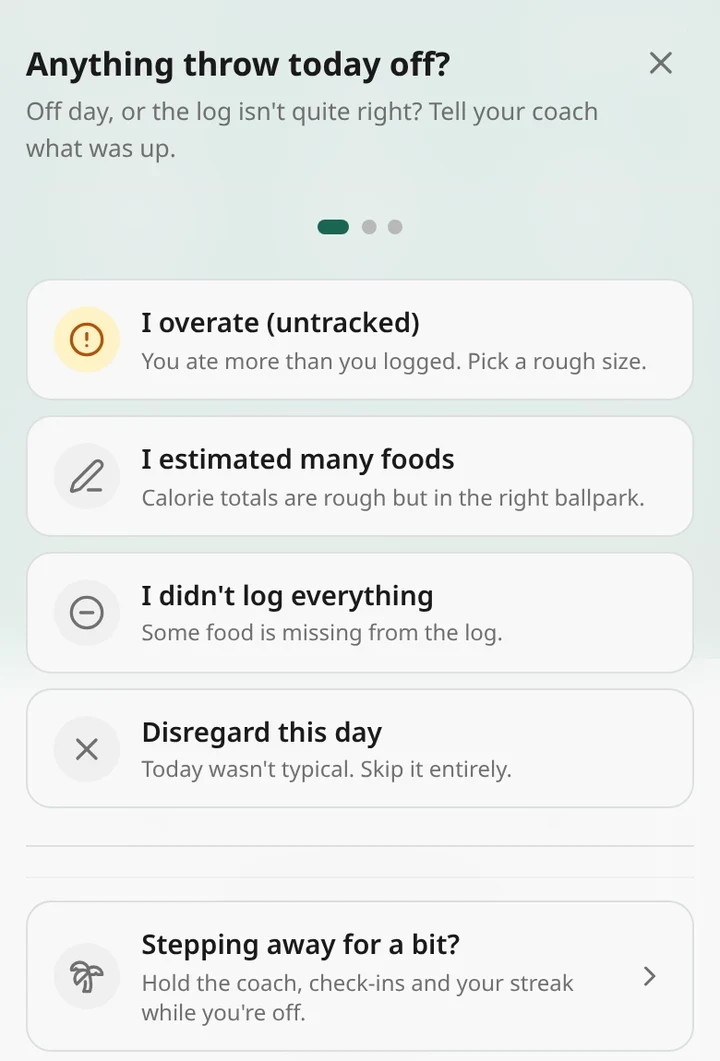
Holidays needed their own fix. Early on, coming back from a trip could get you a cheerful note that your trend had dropped 3.5 kg that week, worked out from two weigh-ins taken before you left. These days, ten quiet days in a row are treated as unknown instead of guessed through, and if you know a break is coming, Stepping away for a bit? on the same sheet tells the app up front. The estimate holds still while you're gone. When you're back, your first weigh-in sets the new starting point and confidence builds up again over the next couple of weeks.
How do I get the most out of it?
- Weigh in most mornings, after the loo and before breakfast, on the same scale. Every day is great; every other day works nearly as well. The trend smooths out the rest.
- Log whole days, even rough ones. A restaurant dinner logged as a Quick meal or a photo estimate tells the engine far more than a diary that stops at lunch. You can also tell the coach what happened.
- Don't trim the big days. If Saturday really was 3,500 kcal, log 3,500. Shaving it down makes your burn look lower than it is, and then your target is too.
- Give it two to three weeks after a change (a new goal, a new training plan) before judging the new number.
- If you have periods, turn on Period tracking in Settings, under Body & health. Weight shifts over a cycle, and knowing where you are in yours stops water weight from throwing the estimate off.
- Pause it for big life changes. Pregnancy, new medication or an injury can move your weight for reasons the maths can't see. Switch back to Auto or Fixed for a while, and talk to your doctor about anything medical.
So, is it any good?
I'd love to give you an accuracy figure measured on real people. I can't yet. Real accuracy needs lab measurements of what people burn, which no app has for its users, and Ampsu is young enough that there isn't much real-world data to grade it on either. So I test the engine against a simulated body instead: a person whose true burn I know, who eats and logs, and whose weight responds by the physics above.
In those tests, someone who logs consistently ends up with an estimate within about 6% of their true burn. After a change in routine it takes two to three weeks to catch up. And it still tends to settle a little low. That's on my list, and if anything it errs towards a slightly bigger deficit than you asked for. As more of you use it, I'll be checking its two-week forecasts against what your scales actually did, and I'll share what I find.
If the number it gives you looks off, tell me at [email protected]. I'd much rather hear about it than have you quietly give up on it.
Start here: set a goal in Auto mode and log for two weeks, weighing in a few mornings a week. Then go to Settings, Nutrition goals, and pick Metabolism. Check the status label now and then, and give it time after any big change.
If tracking starts to feel stressful, it's fine to stop. A registered dietitian can help you find an approach that suits you, and anyone with a medical condition, pregnant, or with a history of disordered eating should set targets with a professional.
Sources
- Frankenfield D, Roth-Yousey L, Compher C. Comparison of predictive equations for resting metabolic rate in healthy nonobese and obese adults: a systematic review. J Am Diet Assoc, 2005.
- Johnstone AM et al. Factors influencing variation in basal metabolic rate include fat-free mass, fat mass, age, and circulating thyroxine. Am J Clin Nutr, 2005.
- Cunningham JJ. Body composition as a determinant of energy expenditure: a synthetic review and a proposed general prediction equation. Am J Clin Nutr, 1991.
- Hall KD. What is the required energy deficit per unit weight loss? Int J Obes, 2008.
- Hall KD. Body fat and fat-free mass inter-relationships: Forbes's theory revisited. Br J Nutr, 2007.
- Hall KD et al. Quantification of the effect of energy imbalance on bodyweight. Lancet, 2011.
- Fothergill E et al. Persistent metabolic adaptation 6 years after "The Biggest Loser" competition. Obesity, 2016.
- Fernández-Elías VE et al. Relationship between muscle water and glycogen recovery after prolonged exercise in the heat in humans. Eur J Appl Physiol, 2015.
- Orsama AL et al. Weight rhythms: weight increases during weekends and decreases during weekdays. Obes Facts, 2014.
- Thurber C et al. Extreme events reveal an alimentary limit on sustained maximal human energy expenditure. Sci Adv, 2019.
- Shcherbina A et al. Accuracy in wrist-worn, sensor-based measurements of heart rate and energy expenditure in a diverse cohort. J Pers Med, 2017.
- Lichtman SW et al. Discrepancy between self-reported and actual caloric intake and exercise in obese subjects. N Engl J Med, 1992.